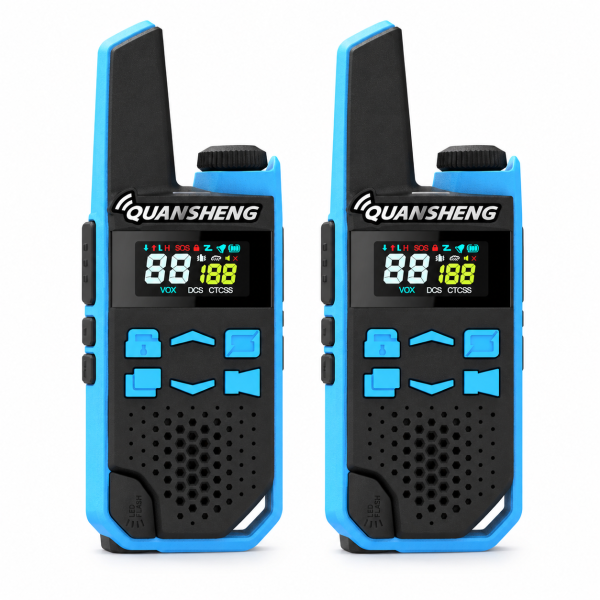
Voice activation can be convenient during everyday activities, but it works best when you test it before heading out. The QUANSHENG TG-FR1 two-radio set lists nine adjustable VOX sensitivity levels. This guide explains a simple way to evaluate voice activation with your pair and decide when ordinary push-to-talk is easier.
Establish a push-to-talk call first
Before enabling VOX, charge both radios with compatible equipment, switch them on and select the same channel with matching CTCSS/DCS settings. Set a comfortable volume, then make a short call by holding PTT to speak and releasing it to listen.
Confirm that the other person can reply. If the basic call fails, compare the channel and code settings first. Changing VOX sensitivity will not correct a mismatched channel configuration.
What VOX changes
VOX triggers transmission through voice rather than requiring you to hold PTT, when it is enabled and configured appropriately. The TG-FR1 listing specifies nine sensitivity levels and notes that results depend on settings and surrounding noise.
Follow your supplied manual to find and enable the VOX setting. Menu sequences and the direction of the sensitivity scale should be checked on your unit rather than assumed from another model.
Run a short speech test
Ask another person to listen on the second radio. Speak a few short phrases at your normal speaking level, pause, and have them report whether the beginning and end were clear. Repeat the same phrases after adjusting one sensitivity level at a time.
Keep your speaking position consistent during the comparison. Note which setting gives useful results in that location. A setting that works at a quiet table may behave differently during an outdoor activity.
Listen for unintended activation
Next, stay silent and observe whether nearby conversation or background noise triggers transmission. Repeat the test in surroundings similar to your intended use, while keeping the activity safe and controlled.
If you cannot find a setting that responds reliably to your voice without unwanted activation, return to PTT. Choosing the button for that situation can make it clearer when you are speaking and when you are listening.
Keep squelch and channel codes separate
The TG-FR1 also has seven squelch levels. Squelch adjusts the reception threshold: higher settings can suppress noise but may also block weaker signals. It serves a different purpose from VOX, which controls voice-triggered transmission.
The listed 121 CTCSS/DCS codes help filter unwanted calls. They do not encrypt conversations or create a private channel. Keep code settings matched across your pair, and change one type of setting at a time during testing.
Prepare both radios for the outing
Once you have tested the controls, agree on the channel and code settings with your partner. Try calls in the actual activity area, because terrain, buildings and obstacles affect communication. Avoid relying on a fixed distance expectation.
Check that you selected the appropriate product edition before purchase. The PMR446 version has 16 channels and the FRS version has 22; these are separate editions rather than switchable modes in one radio. Keypad lock can help prevent accidental changes after setup.
Charge and find support
Follow the supplied charging instructions. The listing says the indicator turns green when charging is complete, and instructs users not to transmit while charging or remove the battery during radio-body Type-C charging.
Review the TG-FR1 product page for current package details and the product video. Visit our Downloads page for available resources. If you need help identifying instructions for your exact edition, contact dxu76256@gmail.com with your model and a description of the test results.
Based on the current SHJ Communications product listing. Available functions and operation depend on the supplied edition and configuration.