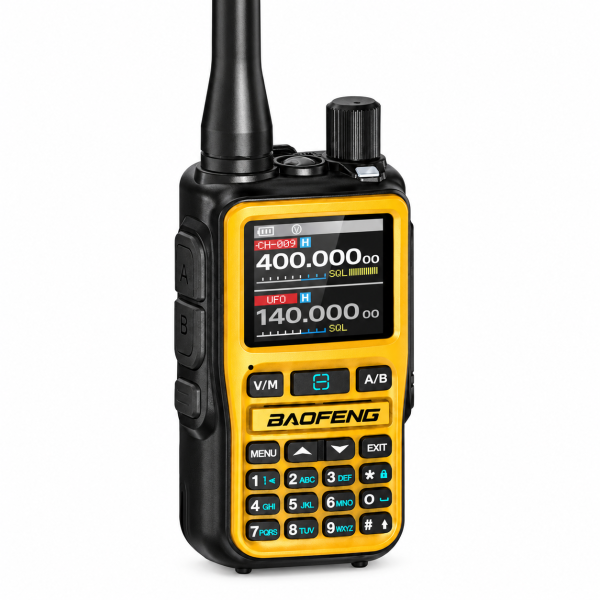
Two PTT buttons can make channel selection more convenient, provided you know which one to press. The BAOFENG BF-5RMINI Orange has dedicated A and B PTT controls alongside dual watch. This guide focuses on those controls and a simple first-call test, rather than treating two buttons as two simultaneous transmitters.
What the A and B PTT buttons do
The product listing describes separate PTT buttons for the corresponding A and B transmit sides. Before making a call, check the channel configured for the side you intend to use, then press its PTT button. The radio transmits on one channel at a time.
For example, if you have configured your intended conversation on side A, use the A PTT control for that test. Do not assume both sides transmit together because the radio has two buttons or shows two selected entries.
Dual watch is a monitoring feature
Dual watch helps monitor two selected channels. It serves a different purpose from choosing a transmit side. Keep your initial setup simple: first establish communication using one intended channel, then test the second side separately.
That order helps distinguish a button-selection mistake from a channel-configuration problem. Once both tests work, practice checking the display and choosing the correct PTT control before speaking.
Prepare one matching channel first
Securely fit the battery and antenna, charge using compatible equipment and set an audible volume. Configure compatible channel and CTCSS/DCS settings on the radios involved. Matching memory numbers alone does not establish that their stored settings match.
Hold the appropriate PTT button while speaking, then release it to listen. Ask the other person to reply and verify the call works in both directions. Repeat for the other side only after the first test succeeds. Use frequencies and settings you are authorized to operate.
Organize the 999-channel memory thoughtfully
The BF-5RMINI supports up to 999 channels, channel and frequency modes, scanning and on-device editing. A large memory capacity is useful, but a short, verified list makes your first session easier.
Keep a separate note of the entries you assign to A and B. If you later edit settings, repeat the same two-way test before relying on the changed configuration. Save an existing profile before editing when your programming software supports it.
Know what Bluetooth programming provides
This model’s stated Bluetooth function reads and writes supported settings through compatible Android programming software. It does not provide Bluetooth headset audio. Choose the correct software for the exact model and version before connecting.
Check our Downloads page for available resources. If you cannot identify the appropriate file or app, ask support before installing software or firmware intended for another radio.
Check charging and package contents
The current listing specifies a 2200mAh, 7.4V battery per radio, with a USB-C port on the battery. Follow the supplied charging instructions and confirm the accessories included in your selected package.
The Single Unit option includes one radio, one battery and one antenna. The 2-Pack includes two radios, with one battery and one antenna per radio. The listed radio functions are the same for both package quantities. Additional charging accessories should be checked against the selected offer.
If the first call does not work
Recheck which PTT button you pressed, the channel assigned to that side, the other radio’s configuration and its volume. Note whether the failure happens on A, B or both, and whether either direction works.
Send those details, your exact radio version and the other radio’s model to dxu76256@gmail.com if you need assistance. Review the BF-5RMINI Orange product page for current package choices and functions.
Based on the current SHJ Communications product listing. Functions and compatibility depend on the supplied version and configuration.