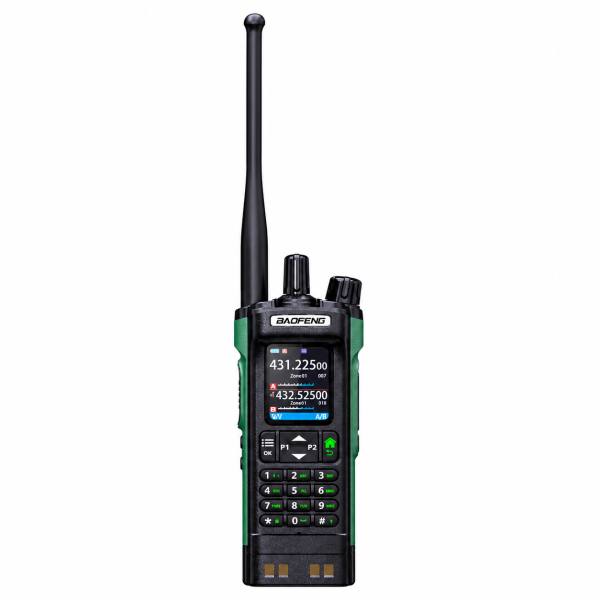
The BAOFENG DM-32 is a dual-band handheld radio supporting DMR digital and analog communication. The current black and green version in our store combines a 2.0-inch color display, a full numeric keypad and PC programming with extensive channel storage. This guide focuses on the choices that matter when preparing your first configuration.
Start with the correct communication mode
A channel can use DMR digital or analog operation. To communicate with another radio, the operating mode and relevant channel settings must be compatible. Sharing a brand name or channel label is not enough.
Our listing notes that DMR operation may require compatible frequency, color code, time slot, contact and receive-group settings. Obtain the confirmed configuration for your intended system before programming. Digital private calls, group calls, all calls and text messages depend on compatible settings.
Organize channels before filling the memory
The listed capacity is 4,000 channels and 250 zones, with up to 64 analog and/or digital channels in each zone. Zones let you group selected channels for easier access.
Begin with a small group you can verify. Use clear names for locations or activities, and separate configurations that serve different purposes. Save a backup before making major changes, with the radio model and firmware version recorded alongside the file. An organized configuration is easier to review than a large collection of unfamiliar channels.
What the digital recording feature means
The DM-32 supports recording in DMR digital mode only. The current listing describes received-call recording, transmitted-call recording or both, plus playback, deletion and viewing record details.
The stated capacity is approximately 10 hours of recording storage. This is storage capacity, not a battery-life claim. Do not assume that analog calls can be recorded by the same feature. Check your installed firmware and manual for the available recording controls.
Display, shortcuts and power settings
The 2.0-inch color display presents channel and operating information. Programmable SK1, SK2, P1 and P2 keys offer shortcuts to selected functions, while the numeric keypad provides direct input.
The product listing specifies nominal 8W high, 4W medium and 1W low output. Choose the setting appropriate to your authorized setup. These specifications do not establish a guaranteed communication distance.
Reception and charging checks
AM airband and FM broadcast are listed as receive-only functions. Scanning options include channel, frequency, frequency-range and CTCSS/DCS scanning. These tools should be considered separately from the settings used for transmission.
The USB-C charging port is described as being on the battery pack. A compatible charging cradle is also supported, and the listing reports that the manual recommends switching the radio off while charging. Review the current package contents for supplied accessories; a charging method listed as supported does not confirm that every accessory is included.
Choose the matching programming resource
The DM-32 supports PC programming for channels, contacts and other settings. Visit our Downloads page for available resources, and confirm the exact model, hardware version and installed firmware before choosing a file.
A programming software package is not automatically a firmware update. Do not substitute a file intended for another model or hardware version. A programming cable is not confirmed as included in the current listing, so check what you need before ordering.
Browse the BAOFENG DM-32 product page for current specifications and package details. For software or product questions, email dxu76256@gmail.com with your exact model and version information.
This guide reflects the current store listing. Functions may vary by firmware and configuration. Check the requirements for your intended operation and location before transmitting.