The BINTE RADIO BT-9000 Transparent Edition combines A/B/C channel monitoring, three PTT controls and GPS/APRS functions in a handheld radio. Its translucent gray housing, black controls, blue keypad legends and orange back key distinguish this version. Here are the main settings to understand before preparing your configuration.
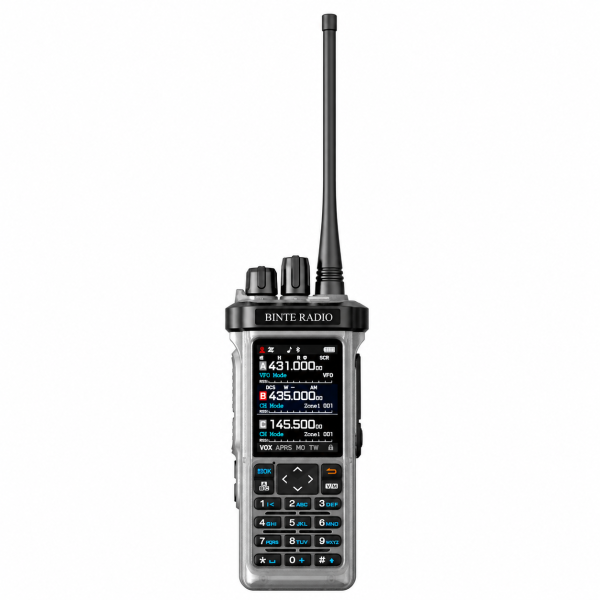
Understand the A/B/C display
The color display presents three channel sections labeled A, B and C. Tri-watch provides a way to monitor these sections from one device. Check the manual for the monitoring behavior and active-channel indication rather than assuming that three displayed sections mean three simultaneous voice conversations.
Start with clearly identified channels and verify their settings. Before transmitting, confirm the intended channel and how your PTT buttons are configured.
The Single PTT setting changes button behavior
The current listing describes two operating choices:
- Single PTT OFF: PTT A, B and C control their respective channels.
- Single PTT ON: any PTT button controls the active channel.
This is a useful setting to check when a button appears to select an unexpected channel. Review the active channel and Single PTT setting together before changing other parts of the configuration. Follow the model-specific manual when setting up the controls.
GPS and APRS require a configured setup
The BT-9000 listing describes a choice between a fixed position and GPS position as the APRS location source. Manual and timed beacon options are available after the required station, channel, position and beacon settings are configured.
Confirm which location source is selected and check the relevant settings before enabling beacons. A fixed position should be reviewed when your operating location changes. The presence of GPS and APRS functions does not establish that a receiving station or an online map service will display every beacon.
Use the manual for your exact version and obtain the confirmed configuration for your intended setup. This buying guide does not replace model-specific operating instructions.
Spectrum, scanning and repeater features
Spectrum mode helps explore signal activity. Frequency scanning and channel scanning provide additional ways to monitor signals and stored channels. Begin with a small set of known settings so the results are easier to interpret.
The product also lists a cross-band repeater function, with reception and transmission configured on different frequency bands. A repeater speaker setting controls local speaker audio during operation. Check the manual and the requirements for your intended setup before enabling this function; the feature is not a promise of a particular coverage distance.
Controls and battery charging
A numeric keypad, navigation keys, power/volume knob and channel knob provide direct control. VOX, programmable shortcuts and keypad lock are also listed. Choose shortcuts you understand and verify their operation before relying on them.
The Type-C charging interface is located on the battery. Use compatible equipment and follow the battery and radio instructions. A charging feature does not confirm which cables or additional accessories are supplied.
Check the edition, package and resources
This listing is for one BT-9000 Transparent Edition radio. Confirm the current package contents and accessory compatibility on the product page. Do not assume a two-radio bundle or extra battery.
Visit our Downloads page to check available resources. If a BT-9000-specific file is not listed, ask support rather than substituting a similarly named model’s software. Confirm the exact hardware and installed firmware before choosing any programming or firmware file.
Email dxu76256@gmail.com with your model, version and a description of the setting you need help with.
This guide reflects the current store listing. Functions depend on configuration and version. Check the requirements for your intended operation and location before transmitting.