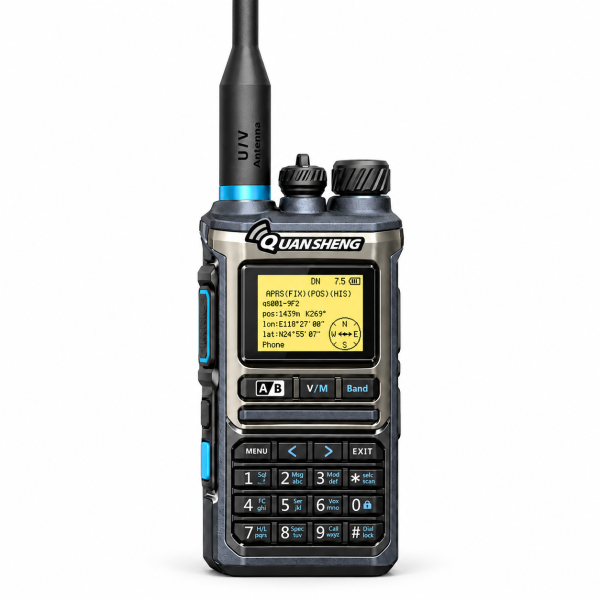
The QUANSHENG UV-K10 Pro brings configurable analog communication, reception tools and several programming methods together in one handheld radio. Our current single-radio listing specifies 999 memory channels and a 2500mAh battery. This guide highlights the everyday features and the version checks to make before ordering.
Analog communication with organized channels
The UV-K10 Pro is an analog two-way radio, rather than a DMR or cellular push-to-talk device. The listing describes VHF/UHF operation, up to 999 stored channels, editable channel names and channel scan lists.
Start with a small set of verified channels and give them clear names. Dual-channel standby helps monitor configured channels, while transmission takes place on one channel at a time. Confirm compatible settings with the people or system you intend to contact.
Choose a programming method
The current offer describes Bluetooth programming through a compatible mobile app, wired programming through compatible PC software and supported on-radio programming. Choose the method supported by your exact version and available equipment.
Before writing a configuration, save the original settings and label the backup with the model and firmware version. Check the selected file before applying it. Programming software and firmware updates are different resources and should not be substituted for one another.
Bluetooth programming does not establish Bluetooth headset support. The supplied product information confirms programming but does not confirm wireless headset audio. Ask support before buying an accessory for that purpose.
Battery and USB-C charging options
The listed battery is a 2500mAh polymer lithium pack. USB-C charging is supported through both the radio body and the battery. Follow the instructions for your exact equipment and use compatible charging accessories.
A charging cradle is described as optional. It should not be assumed to be included. The confirmed package is one UV-K10 Pro radio and one 2500mAh battery; check the current offer for any additional accessories.
Battery capacity does not guarantee a fixed operating time. Usage, transmit-power selection and other settings affect the result. The specified maximum output is up to 10W with high, medium and low settings, rather than a guaranteed communication distance.
Reception and signal tools
The listing includes multi-band reception, FM/AM reception, a spectrum analyzer, frequency meter, signal-strength display and an adjustable VFO scan range. These features provide different ways to inspect supported signals, with reception capabilities dependent on the version and configuration.
Ten NOAA weather channels are described for reception of available broadcasts. One-key matching and wireless radio replication require compatible radios and settings. Detecting or copying a channel does not by itself establish authorization to transmit.
Check optional hardware before ordering
GPS positioning and Si4732 medium/shortwave reception are optional. Their inclusion has not been confirmed for the current offer. Do not assume every UV-K10 Pro includes them because they appear in a series brochure.
SSB/CW reception is not claimed for this listing. Likewise, APRS support listed among the radio’s functions should not be treated as confirmation of an included GPS module. If a hardware-dependent feature matters to you, obtain confirmation for the exact unit before ordering.
Display customization and support
The 1.44-inch display supports adjustable RGB background colors and a custom power-on image. A full keypad, channel-name editing, VOX and keypad lock add practical controls. Follow the applicable instructions when changing display or radio settings.
See the QUANSHENG UV-K10 Pro product page for current details. Check our Downloads page for available resources, or contact support if a UV-K10 Pro-specific file is not listed.
Email dxu76256@gmail.com with your model, hardware and firmware version for help identifying a resource or confirming an optional feature.
This guide reflects the current store listing. Functions depend on hardware, configuration and version. Check the requirements for your intended operation and location before transmitting.