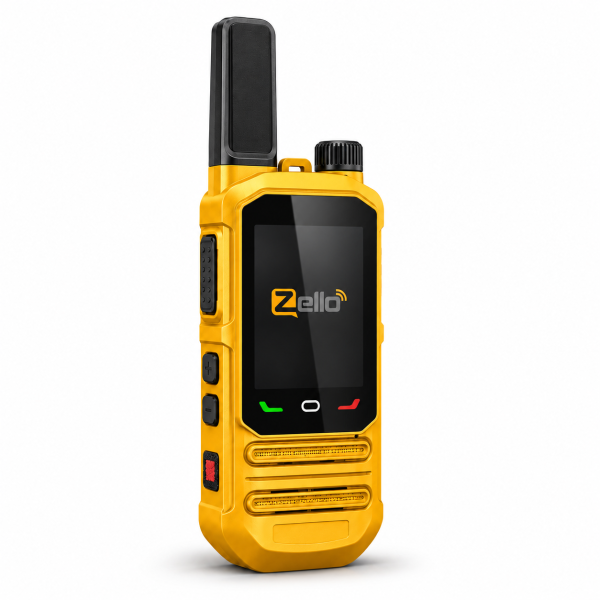
The SHJ 360 PoC radio combines a 2.4-inch Android touchscreen with physical push-to-talk controls. Its yellow housing and black front panel distinguish the current single-unit offer. If you want a dedicated network radio with touchscreen access to supported applications, start by checking the platform and connectivity supplied for your setup.
Choose cellular data or compatible Wi-Fi
The current listing describes communication through compatible cellular data service or Wi-Fi using a configured PTT application. Wi-Fi support is 2.4GHz IEEE 802.11b/g/n. The radio still needs a suitable connection and correctly configured platform account.
Cellular hardware versions vary by region. Confirm the supplied version, destination and carrier compatibility before ordering. Do not assume that the same hardware works with every operator or that a network radio can communicate where no suitable connection is available.
Understand the lifetime-free platform offer
This offer includes lifetime-free access to the PTT platform supplied with the product, without recurring subscription fees for that included platform.
Cellular data, SIM service and subscriptions to other platforms are separate unless expressly included. SIM-card inclusion is not specified for this offer. Confirm the actual package and service arrangement before purchase.
The Zello interface in the reference images should not be treated as confirmation that every Zello or other third-party subscription is included. Ask which application and account service will be supplied for your order.
Touchscreen access with physical PTT
The 2.4-inch capacitive touchscreen and Android 8.1 interface provide access to supported applications, contacts, group lists and device settings. Application installation depends on compatibility; an Android interface does not mean every current mobile app will run.
A physical PTT button, top rotary power/volume control, side shortcut keys, Home and Back controls complement the touchscreen. Follow the instructions for the installed application when selecting a group or requesting speaking permission.
Check group and individual calling
Group and individual communication are available through the configured platform, subject to account settings and application support. Confirm that the users you intend to contact have compatible service and appropriate group membership.
For a first test, check the network connection, selected group and listening volume. Make a short call with one known participant before expanding the group. Troubleshoot connectivity and account configuration separately if communication does not work.
Positioning and Bluetooth depend on the setup
The current specifications include GPS, BDS and GLONASS positioning. Location sharing and management features depend on the installed application, permissions and settings. Positioning hardware alone does not establish a complete tracking service.
Bluetooth 4.2 is also listed. Confirm support for the specific headset or accessory you want to use, because available functions depend on software and accessory compatibility.
Charging, accessories and package quantity
The SHJ 360 supports USB-C charging with compatible equipment. The Type-C earphone interface requires a dedicated compatible earphone; do not assume that any USB-C headset will work.
This offer is one radio with lifetime-free access to the included platform. Check the current listing for supplied accessories and connectivity details. It is not a two-radio package.
See the SHJ 360 product page for current specifications. Visit our Downloads page for available resources, or ask support for model-specific instructions if you cannot identify the correct file.
Email dxu76256@gmail.com with your intended country, carrier and application or accessory requirements.
This guide reflects the current store listing. Communication and application features depend on hardware compatibility, network access, account settings and service availability.