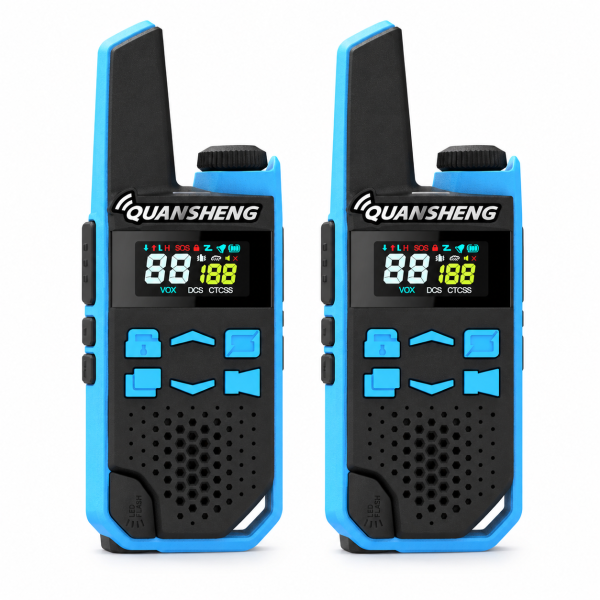
A two-radio set is convenient only when both units are ready to communicate. The QUANSHENG TG-FR1 2-pack combines physical controls, an integrated antenna and Type-C charging. This guide explains the choices to check before ordering and a straightforward way to test your pair before heading out.
1. Select the correct edition first
The current listing offers a PMR446 edition with 16 channels and a separate FRS edition with 22 channels. These are different product versions, rather than two operating modes that you can switch between on one radio. Confirm the selected edition on your order and check the requirements for your destination before purchase.
If you plan to add the pair to radios you already own, ask support about the exact models and versions involved. Matching a channel number on the displays alone does not establish compatibility between different editions or products.
2. Make your first call with both radios nearby
Charge both units using compatible equipment, then use the top knob to turn them on and set an audible volume. Select the same channel on each radio and make sure their CTCSS or DCS settings match. Start with a simple push-to-talk test before changing other features.
Hold PTT while speaking, then release it to listen. Have the second person reply and confirm that communication works in both directions. If one unit stays silent, recheck the selected channel, code settings and volume before assuming there is a hardware problem.
3. Understand what the 121 codes do
The TG-FR1 listing specifies 38 CTCSS and 83 DCS codes. These settings help filter unwanted calls; they do not encrypt your conversation or make a shared channel private. Keep the settings consistent across your pair and record them so an accidental menu change is easier to identify.
For troubleshooting, compare the complete settings on both units rather than only the main channel number. A different receive code can make a radio appear unable to hear the other unit.
4. Adjust VOX and squelch gradually
VOX provides voice-activated transmission with nine sensitivity levels. Test it in the environment where you intend to use the radios: background noise can affect operation. Establish reliable PTT communication first, then enable VOX and check that speech triggers transmission as expected.
Seven squelch levels let you adjust the reception threshold. A higher setting may reduce unwanted noise but can also suppress weaker signals. Change one setting at a time and repeat the same short call test so you can judge its effect.
5. Use charging and everyday controls deliberately
The product instructions specify Type-C charging and a green indicator when charging is complete. Do not transmit while charging, and do not remove the battery during radio-body Type-C charging. Confirm charging equipment and any additional accessories against your selected package.
The 1.3-inch display shows channel, code and status information. Keypad lock helps prevent unintended changes after setup. Channel scanning and nine call tones are also listed. The built-in light can be useful, while the SOS button should not be treated as an automatic connection to emergency services.
6. Test the actual route and keep settings handy
Try your pair around the buildings, paths or activity area where you expect to communicate. Terrain and obstacles affect usable range, so avoid relying on a fixed distance promise. Agree on a channel and a practical check-in routine before separating.
See the TG-FR1 product page for current version choices and its product video. Check our Downloads page for available resources. If your exact manual or resource is not listed, contact dxu76256@gmail.com with your edition and order details before using files intended for another model.
This guide follows the current SHJ Communications listing. Specifications, accessories and availability can vary by selected version.