The M2 wrist-worn PoC radio puts network push-to-talk controls on your wrist. Its black housing, LCD display and front PTT button offer an alternative to carrying a handheld radio in a pocket or on a belt. Before choosing it, check how its platform service, cellular connection and accessories fit your setup.
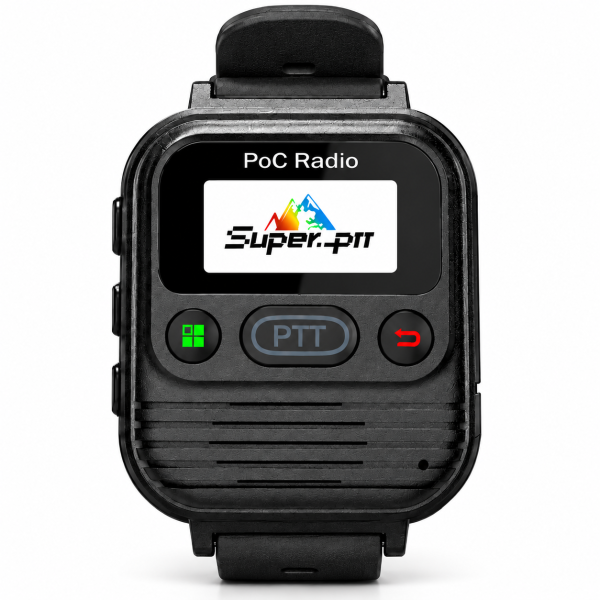
A wrist-worn communication device
The M2 is designed to keep its display and controls accessible on your wrist. Its listed body dimensions are 75 × 48 × 21 mm; these are device dimensions rather than strap length or shipping-package measurements.
Consider where you will wear it and whether you can comfortably reach the controls during your usual activities. The product is a PoC communication radio. Health monitoring, fitness tracking and other smartwatch functions are not specified.
Platform access and mobile data are separate
The current offer includes lifetime-free Super-PTT platform access. Free platform access does not automatically include free cellular data. Free SIM or mobile data service has not been specified for this M2 listing.
Operation requires compatible cellular coverage, an active compatible SIM/data service and correct configuration. Confirm compatibility for the country or region where you plan to use it before ordering. A network radio cannot provide off-grid communication where suitable service is unavailable.
Participants also need compatible Super-PTT service and appropriate account settings. Do not assume the M2 can directly communicate with any conventional analog or DMR radio.
Built-in PTT or a wired finger control
The front-mounted PTT button provides direct push-to-talk control without an external accessory. Menu, back, power and volume/channel controls support everyday operation.
The M2 also supports the compatible wired finger PTT shown in the product images. This accessory uses a cable; it is not a wireless finger button. Its described operation is press and hold to talk, then release to listen.
Confirm whether the finger PTT is included in your selected package before ordering. Product illustrations can demonstrate compatible accessories without establishing that those accessories come with every order.
Prepare a simple first-call test
Check cellular service and device status before troubleshooting group communication. Follow the instructions for your installed version to configure the device and compatible Super-PTT account settings.
For an initial test, use a small group of correctly configured participants. Confirm the intended group or channel selection and try a short call using the built-in PTT. If you later add the wired accessory, check its operation separately so that connection and service issues are easier to distinguish.
Battery and Type-C charging
The current listing specifies a 2500mAh battery and Type-C charging. Actual battery life depends on usage, settings and network conditions; capacity alone does not guarantee a fixed runtime.
Use compatible charging equipment and follow the device instructions. Review the actual package contents before assuming a particular cable, external PTT or other accessory is supplied.
What to confirm before ordering
- The cellular service and country compatibility for your intended location.
- The compatible Super-PTT setup for the people you want to contact.
- Whether you need the optional wired finger PTT and whether it is included.
- The single-unit quantity: this listing is one radio, not a pair.
See the M2 product page for current specifications and package information. Visit our Downloads page for available resources, or ask support for the correct model-specific instructions if you cannot identify them.
Email dxu76256@gmail.com with your model, intended country and service or accessory question.
This guide reflects the current store listing. Communication depends on compatible coverage, service availability and correct configuration.