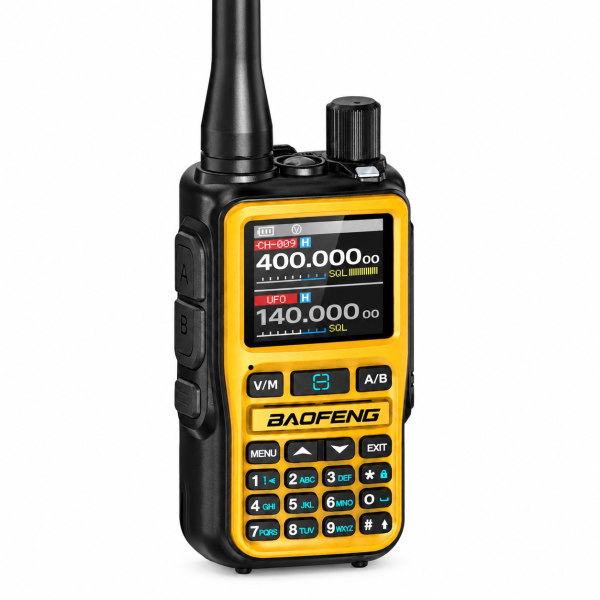
The BAOFENG BF-5RMINI combines a compact analog radio with dedicated A/B PTT buttons, Android Bluetooth programming and a battery with USB-C charging. This guide explains the features listed for the orange model in our store and the details to check when choosing your package.
What do the two PTT buttons do?
The BF-5RMINI has dedicated A and B push-to-talk buttons. Each selects the corresponding transmit side, giving you direct access to the channel assigned to that side.
Dual watch supports monitoring the two selected channels. The radio transmits on one channel at a time. Before using either PTT button, check the displayed channel and confirm that the other radio uses compatible settings.
Bluetooth programming with Android
The listed Bluetooth function lets compatible Android programming software read and write supported radio settings. Confirm the correct application, radio version and connection instructions before starting.
Bluetooth programming does not provide Bluetooth headset audio on this model. If you need wireless audio, check the specific accessory and radio requirements before ordering.
Prepare your channel information first. Where the software supports reading and saving the existing configuration, make a backup before writing changes. Review the settings you intend to use instead of importing an unfamiliar configuration without checking it.
999 channels and direct keypad controls
The BF-5RMINI supports up to 999 stored channels. Channel and frequency modes, scanning, CTCSS/DCS settings and on-device editing provide several ways to manage a compatible analog setup.
A color display and full keypad help you check and access radio settings. Practical listed functions include VOX, keypad lock, a programmable side key and a built-in flashlight. Availability and operation depend on the supplied version and configuration.
USB-C charging and the battery
Each radio has a 2200mAh, 7.4V battery. Its USB-C charging port is located on the battery. Follow the supplied charging instructions and check which charging accessories are included in your selected package.
The listing also identifies charging cradle compatibility. Confirm the exact cradle and package contents rather than assuming every charger is included. Battery capacity alone does not establish a fixed operating time: use patterns and settings affect battery life.
Single Unit or 2-Pack?
- Single Unit: one orange BF-5RMINI radio with its battery and antenna.
- 2-Pack: two orange BF-5RMINI radios, each with its own battery and antenna.
A single unit may suit an existing compatible setup. A two-radio pack gives you two devices to configure together. The model and listed functions are the same; check the live product page for the current price, package options and included accessories.
Compatibility checks before your first conversation
For analog communication, the radios need compatible frequencies and signaling settings. A matching channel number or brand name alone does not establish compatibility. Check the programmed channel information on both devices.
The BF-5RMINI is an analog FM radio. It does not use a SIM card or cellular push-to-talk platform. AM airband and FM broadcast functions are for reception. Use radio transmission settings that are permitted for your location and authorization.
Find software and support
Visit our Downloads page for the BAOFENG UV-5RMINI software entry. Confirm compatibility with your exact BF-5RMINI hardware version before installing the file. Contact us if you are unsure which resource to use.
View BF-5RMINI package options →
Contact SHJ Communications with your model name and setup question for assistance.
Based on the orange BF-5RMINI store listing checked on 5 October 2026. This article is a product guide; communication coverage varies with terrain, buildings, antenna placement and operating conditions.