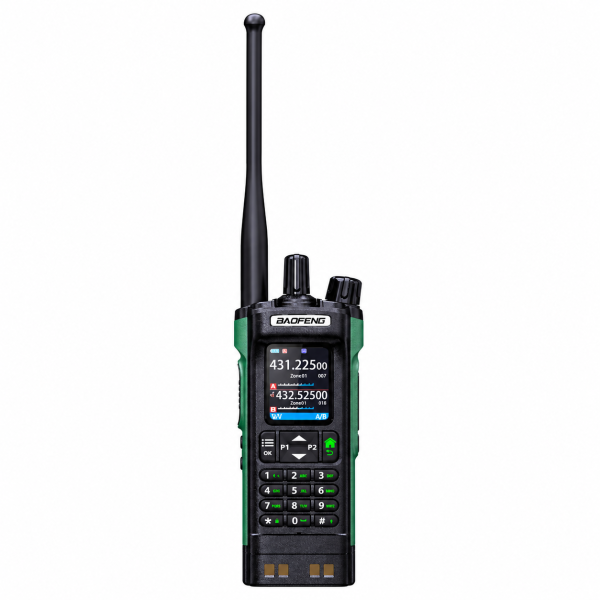
The BAOFENG UV-32 combines a 2.0-inch color display, a full numeric keypad and Bluetooth app programming in a dual-band analog handheld radio. If you want to manage several channel groups without relying only on keypad entry, its configuration tools are worth a closer look.
What Bluetooth programming does
Our current listing describes Bluetooth programming through the BAOFENG Android app. The workflow lets you read the radio configuration, edit channel and radio settings, save a profile and write your selected configuration back to the radio.
Bluetooth here is described for programming. The listing does not establish Bluetooth headset support or iPhone app compatibility, so confirm those requirements separately before ordering.
A useful approach is to save the original configuration first, name the backup clearly and make a small set of changes. Review the selected profile before writing it to the device. Follow the instructions for your exact radio and app version rather than using steps from a similarly named model.
Keep 1000 channels organized in 10 zones
The listed capacity is up to 1000 memory channels across 10 zones, with 100 channels per zone. Editable channel names help identify saved settings.
Group channels according to your own confirmed setup, such as a local group and a separate travel configuration. Start with the channels you actually need; a long list is easier to use when its names and grouping are consistent. Keep a backup whenever you make a significant change.
Dual display and dual watch
The screen presents A and B channel information. Dual watch monitors the two selected channels alternately. This is an important distinction when comparing radios: two channels shown on screen should not be treated as a claim of simultaneous dual reception.
Check the manual for how channel selection and monitoring work with your configuration. The numeric keypad, navigation keys and menu controls provide access to the radio’s settings.
Search, scanning and reception
The product listing includes one-touch frequency search, CTCSS/DCS search, frequency scanning and channel scanning. Search tools can assist with configuration, but any settings you find still need to be checked against the intended communication setup.
FM broadcast and AM airband are described as reception functions. They do not indicate permission or capability to transmit on those services. The radio also lists supported VHF/UHF reception, with the supplied version’s transmit settings considered separately.
Charging and package checks
The UV-32 supports Type-C and desktop charging. Confirm the current package contents and compatible charging equipment before buying; support for a charging method does not by itself confirm which accessories are included.
The black and green product option is a single radio. Review the exact listing rather than assuming a pair, an additional battery or a programming cable is included.
Find the right software
Visit our Downloads page for available UV-32 resources. Check the exact model, hardware version and installed firmware before choosing a file. PC programming software, a mobile app and a firmware update are different resources; one should not be substituted for another.
See the BAOFENG UV-32 product page for current specifications and ordering details. If you need help identifying software, email dxu76256@gmail.com with your model and version information.
This guide reflects the current store listing. Functions and software compatibility can vary by version. Check the requirements for your intended operation and location before transmitting.