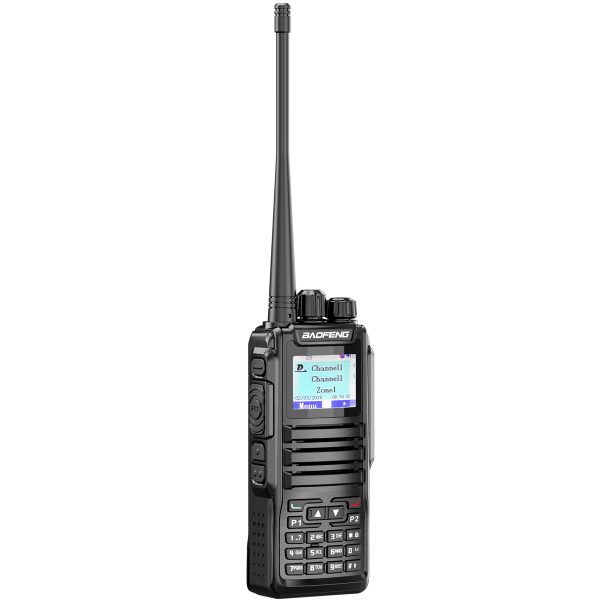
The BAOFENG DM-1701 is a dual-band handheld radio for users who want both DMR digital and analog FM operation in one device. Its full-color display, numeric keypad and organized channel storage make it worth considering when your communication setup includes several groups or repeaters.
One radio, two communication modes
The DM-1701 supports DMR digital and analog FM channels. This gives you a choice of modes for different communication setups, but the radios you want to contact still need compatible settings. Selecting a familiar channel name alone does not establish compatibility.
Before using a saved channel, confirm its intended operating mode and settings with the person or team responsible for that channel. The factory firmware supports digital private calls, group calls and all calls, as well as compatible digital repeater operation. These functions depend on the channel configuration and the system you are using.
Use zones to keep channels organized
According to the current product listing, factory firmware supports up to 3,000 channels across 250 zones, with up to 64 channels in each zone. A zone is a useful way to group saved channels so that everyday choices are easier to find.
Start with a small, clearly named group of channels instead of filling the radio immediately. For example, you could keep a confirmed local setup in one zone and a separate, verified travel setup in another. Keep a copy of your programming file and record which radio and firmware version it belongs to.
What OpenGD77 compatibility means
The store lists the DM-1701 as compatible with installation of OpenGD77 alternative firmware. This is an option for users interested in an amateur radio-oriented interface and operating experience.
Compatibility does not mean OpenGD77 comes pre-installed. Installing alternative firmware replaces the factory firmware. The interface, supported functions and channel behavior can differ, so factory firmware specifications should not be assumed to describe every alternative firmware version.
If you are considering this change, first identify your exact radio model and hardware version. Follow the project’s current model-specific documentation and use the matching programming software. A familiar model name or a similarly named download is not enough to confirm that a firmware file is suitable. If you are unsure, ask for support before installing it.
Display, controls and selectable power
The full-color LCD shows channel and operating information. A full numeric keypad supports direct frequency entry, and programmable function keys provide shortcuts to configured functions. Channel scanning and VOX voice activation are also listed, with operation depending on firmware and configuration.
The listed output settings are 5W high and 1W low. These values are equipment specifications rather than a guaranteed communication distance. Terrain, buildings, antenna setup and other operating conditions affect the result. Choose an appropriate setting for your authorized setup.
Before ordering: a short checklist
- Match the model: confirm that you need the DM-1701 and that it suits the system you intend to use.
- Choose your firmware approach: decide whether you want to start with factory firmware or investigate OpenGD77 separately.
- Check the package: this listing is for one black DM-1701 radio. Review the current product page for accessory details; do not assume a programming cable or extra battery is included.
- Plan your channel setup: obtain confirmed settings for the people or system you intend to contact.
- Match software to the device: check the exact model and installed firmware before selecting a programming tool or firmware file.
Product information and support
See the BAOFENG DM-1701 product page for the current specifications and ordering details. Visit our Downloads page for available programming resources. A factory programming download should not be treated as an OpenGD77 firmware package.
For help checking a file or product option, email dxu76256@gmail.com with your model, hardware version and installed firmware version, if known. Those details help our team understand your setup.
This guide describes the current SHJ Communications product listing. Firmware-dependent functions may vary. Check the requirements that apply to your intended operation and location before transmitting.