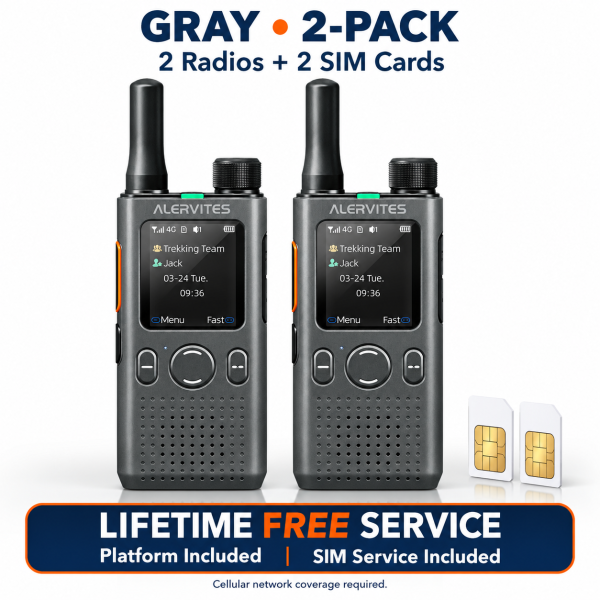
The ALERVITES POC-AT1 two-radio set uses supported 4G LTE networks and the OLA Radio platform for push-to-talk communication. The dark-gray package currently listed by SHJ Communications includes two radios and two SIM cards. This guide explains the service offer and the setup checks to make before your first conversation.
Start with network compatibility
These radios communicate through a cellular network and an online platform. Before ordering, confirm compatibility for the country and operator where you intend to use them. Suitable coverage, available service and correct activation are required.
A cellular push-to-talk radio should not be treated as an off-grid radio. If a location has no compatible coverage, the included service does not create coverage there. Check the places where your team actually needs to communicate.
What the included service offer covers
The current offer includes two SIM cards, lifetime-free included SIM service and lifetime-free OLA Radio platform access for the supplied devices, without recurring subscription fees for those included services.
This describes the service package for the supplied radios. It is not a guarantee of worldwide coverage, uninterrupted availability or a lifetime hardware warranty. Ask support to confirm the service arrangement for your destination before ordering.
Create a group for your first conversation
The OLA Radio companion app supports device binding, group creation, member management and invitations. The current listing identifies Android and iOS app support. Follow the instructions for your device and app version when binding the radios.
Group setup can also be performed from the radio menu. The listed workflow lets you create a group and generate a sharing code, or enter a six-digit code to join an existing group. These sharing codes are time-limited, with a maximum validity of 300 seconds.
If a code no longer works, check whether it has expired and obtain a current invitation. Confirm that both radios are online and that the intended group is selected before testing the PTT button.
Choose group, private or temporary calling
Group calling addresses the current group. Private calling selects an online member, while a temporary conversation can involve multiple selected online members. Online-member indicators help identify available participants.
For a simple test, select the intended group on both radios and make a short call. Keep the first setup small so it is easier to check group membership and device status. Group administrators can add or remove members and update group information through supported app controls.
Use the physical controls deliberately
A dedicated PTT button provides talk control. The top group selector browses groups, and front buttons provide volume adjustment and menu navigation. The display shows group, member and operating information.
Check the selected group before speaking, particularly after using the selector. The current listing also includes keypad lock, backlight settings, microphone gain adjustment and different voice and performance modes. Review the model-specific instructions before changing these settings.
Charging, updates and package checks
The radio supports USB-C charging, with a listed input of 5V/1A, and uses a removable battery. This offer is a two-radio set with one battery per radio. Check the current package details for cables and other accessories rather than assuming that a charging cradle or headset is supplied.
OTA software updates are listed. Follow the instructions for the installed device and platform version. Do not use programming or firmware files intended for conventional analog radios simply because the devices look similar.
See the ALERVITES POC-AT1 product page for current specifications and service details. Visit our Downloads page to check available resources, or contact dxu76256@gmail.com for the correct OLA Radio setup instructions.
This guide reflects the current store listing. Communication depends on compatible coverage, service availability and correct configuration.