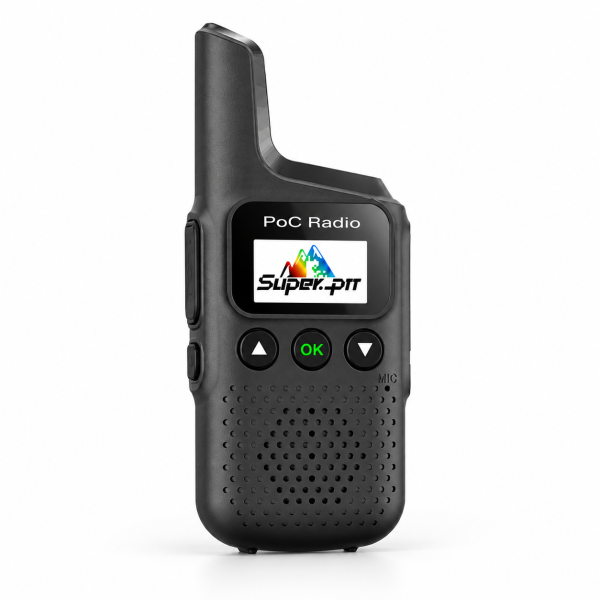
The M1 compact 4G PoC radio offers Super-PTT network communication in a small handheld device. Its integrated antenna, LCD display and dedicated PTT button keep the control layout straightforward. Before choosing it for daily communication, check both the included platform access and the separate requirements for mobile connectivity.
Choose it for a compatible network setup
The M1 uses supported 4G networks for Super-PTT push-to-talk communication. Participants need compatible service and appropriate account settings. It should not be assumed to communicate directly with an arbitrary analog or DMR radio.
Check compatibility for your intended country or region before ordering. Coverage, device/network compatibility and service availability all matter. A network radio does not provide off-grid communication where suitable cellular service is unavailable.
Platform access is separate from mobile data
The current listing includes lifetime-free Super-PTT platform access. This does not establish that a SIM card or mobile data service is included or free. An active compatible SIM/data service is required for network communication.
When comparing offers, separate the radio hardware, platform access and mobile connectivity into three items. Confirm what is supplied for each one rather than transferring a service promise from another PoC model to the M1.
Compact dimensions and accessible controls
The listed device dimensions are 105 × 45 × 26 mm. Its black exterior and integrated antenna provide a compact form for everyday carrying, while the LCD displays operating information.
The control layout includes a dedicated PTT button, Up and Down buttons, and an OK/confirmation button, along with the microphone and speaker. Follow the instructions for your installed version to select the intended communication setup before making a call.
Prepare a first-call test
Start with a small group of intended participants. Configure compatible Super-PTT accounts and group settings according to the model-specific instructions, then verify that each device has suitable network service.
Check the selected group, device status and listening volume before making a short test call. If communication fails, review connectivity and account/group configuration separately. This helps distinguish service issues from a control or audio setting.
Do not assume that another radio can join simply because it has a similar screen or PTT button. Confirm platform and account compatibility first.
Battery and Type-C charging
The current product information specifies a 2000mAh battery and Type-C charging. Actual operating time varies with usage, network conditions and device settings. Battery capacity is not a guarantee of a fixed runtime.
Use compatible charging equipment and follow the instructions for your radio. Review the actual package details before assuming that a particular cable, charger or spare battery is included.
Single-unit package and resources
This listing is one M1 radio with lifetime-free Super-PTT platform access. It is not a two-radio kit, and free mobile data has not been specified. Confirm connectivity and accessory details before placing an order.
See the M1 product page for current specifications. Visit our Downloads page to check available resources. If you cannot identify M1-specific setup instructions, ask support rather than using a similarly named model’s software or firmware.
Email dxu76256@gmail.com with your model, intended country and the service or setup question you need help with.
This guide reflects the current store listing. Communication depends on compatible coverage, service availability and correct configuration.