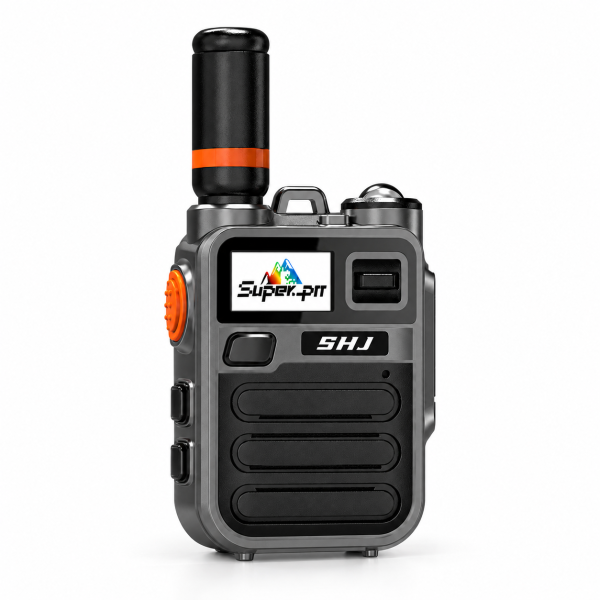
The SHJ K28 Super-PTT radio combines network push-to-talk communication with a zinc alloy exterior. Its gray metal finish, black front panel and orange accents give it a distinctive appearance. The current single-unit offer includes a SIM card and lifetime-free included SIM and platform services. Here is what to check before adding it to your communication setup.
Check service availability where you will use it
The K28 uses Super-PTT for network voice communication. It can connect compatible users across supported countries and regions when compatible coverage and service are available.
Before ordering, identify your intended country and the locations where you need to communicate. Ask support to confirm service availability for that destination. A cellular network radio does not create coverage in an area without suitable service.
If your team works across several locations, check each location separately. Broad geographic availability should not be interpreted as guaranteed coverage in every building, remote area or country.
Understand the included services
The current package includes a SIM card with lifetime-free included SIM service and lifetime-free access to the Super-PTT platform. Both are listed as part of this K28 offer.
These terms describe the included services, rather than a lifetime hardware warranty or a guarantee of uninterrupted connectivity. Correct service configuration and compatible network coverage remain necessary. Confirm any destination-specific questions before purchase.
Plan compatible accounts and groups
Communication participants need compatible Super-PTT service and appropriate account and group settings. A radio’s appearance or use of a PTT button does not establish platform compatibility.
Super-PTT app users can participate when their accounts and groups support the connection. This can be useful when you want a dedicated radio user and a compatible app user in the same communication setup. Confirm the account arrangement instead of assuming every installed app can immediately join.
The current package does not include a smartphone. Any app user needs their own suitable device and connectivity.
Make a small first-call test
Follow the correct model-specific instructions to configure the device and service. Start with a small group of intended participants and verify that the K28 and the other users are available in the compatible group.
Check device and network status, the selected group and audio settings before making a short test call. If a participant cannot hear the conversation, review group membership and service availability before assuming a hardware problem.
Keep the radio model and account or device identification details available for support, but do not publish account credentials or sharing details in a public group.
Exterior and practical features
The zinc alloy exterior gives this edition its metal appearance. The current listing also confirms a built-in flashlight for everyday lighting tasks.
Housing material should not be treated as an unstated waterproof or impact rating. Likewise, a built-in flashlight is a convenience feature rather than a guarantee of emergency assistance. Choose the radio based on its confirmed specifications and your actual operating conditions.
Confirm the single-unit package and resources
This offer is one SHJ K28 radio with one SIM card, lifetime-free included SIM service and lifetime-free Super-PTT platform access. It is not a two-radio bundle. Check the current offer for any additional accessory details.
See the SHJ K28 product page for current information. Visit our Downloads page to check available resources, or contact support if you cannot identify K28-specific setup instructions. Do not substitute a similarly named radio’s software or firmware.
Email dxu76256@gmail.com with your intended country, radio model and the service or group question you need help with.
This guide reflects the current store listing. Communication depends on compatible coverage, service availability and correct configuration.