The X1 SDR shortwave receiver offers a desktop approach to listening and signal exploration. Its black enclosure, orange controls and illuminated color display combine hands-on tuning with spectrum and waterfall views. Before ordering, it is helpful to understand the supplied configuration and the equipment needed to complete your setup.
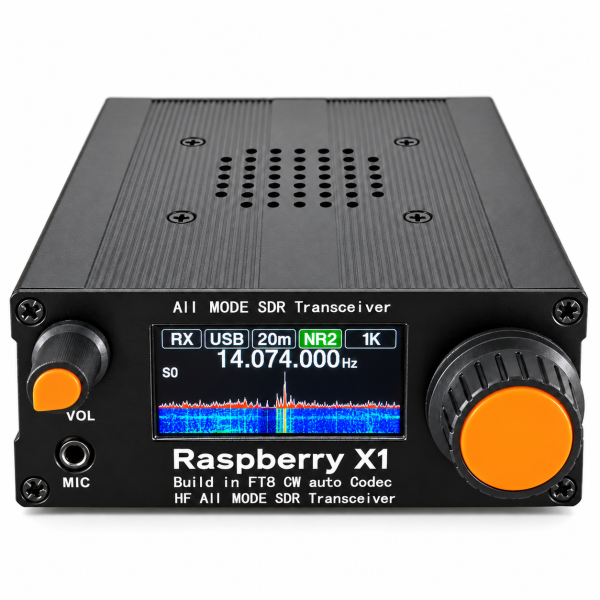
Choose it for the listed reception range
The current store listing gives a supplier-listed reception range of 3.5–30 MHz. Supported modes are LSB, USB, CW-L, CW-U, AM and FM. Choose a mode appropriate to the signal you are listening to within that supported range.
FM mode here should not be confused with coverage of the ordinary 88–108 MHz FM broadcast band. Reception of that band is not specified for this offer. Check the listed range and mode together when deciding whether the receiver fits your interests.
Watch activity with the spectrum and waterfall
The display combines a spectrum trace with a waterfall view, helping you observe signal activity and changes over time. The listed spectrum view is 30 kHz: it shows a portion of the band around the selected frequency, rather than the receiver’s complete tuning range at once.
Start with a known signal and make small tuning changes. Observe the display while listening so that you can relate visible activity to what you hear. Antenna placement and local interference can affect the result.
Explore CW and FT8 decoding
The product listing describes built-in CW decoding and standalone FT8 decoding. These features provide ways to view supported received signals directly on the device.
Decoding is affected by signal strength, interference, tuning and settings. FT8 also requires accurate time synchronization. If the display does not decode a signal, check the setup and reception conditions before assuming the receiver is faulty. Consult the instructions for the supplied version for the relevant controls.
Adjust noise controls one at a time
Noise reduction, a noise blanker and a notch filter are listed among the receiver’s signal-processing options. Their usefulness depends on the type of noise and the signal you are trying to hear.
Compare the sound before and after each adjustment. Changing one setting at a time makes it easier to identify what helps. These controls do not guarantee that every weak signal or source of interference can be resolved.
Prepare an antenna and compatible power supply
The X1 uses a BNC antenna connector. Select a suitable external antenna and consider its placement as part of your listening setup. The listing does not include an antenna.
The listed power connector is 5.5 × 2.1 mm DC. Connector size alone does not confirm electrical compatibility. Confirm the required voltage, current and polarity for the exact unit before connecting a supply. A power supply is not included in the current package.
Understand the supplied receiver configuration
This offer is for the receiver version. The word “Transceiver” printed on the enclosure does not establish ready-to-use transmission capability. The listing states that transmission requires separate DIY modification and is not included as a working function in the supplied configuration.
No transmit-power specification is provided for the receiver sold here. Choose this listing on the basis of its confirmed receiving functions and ask support if your intended use requires something else.
Before you order
- Confirm that the listed tuning range and receive modes match the signals you want to explore.
- Plan a suitable BNC antenna and verify the exact power requirements.
- Allow for the main-unit-only package; antenna, power supply and microphone are not included.
- Check model and version information before using any software or firmware resource.
See the X1 SDR receiver product page for current details. Check our Downloads page for available resources, or email dxu76256@gmail.com if you need help identifying instructions for your unit.
This guide reflects the current store listing. Reception and decoding depend on equipment, settings and signal conditions.