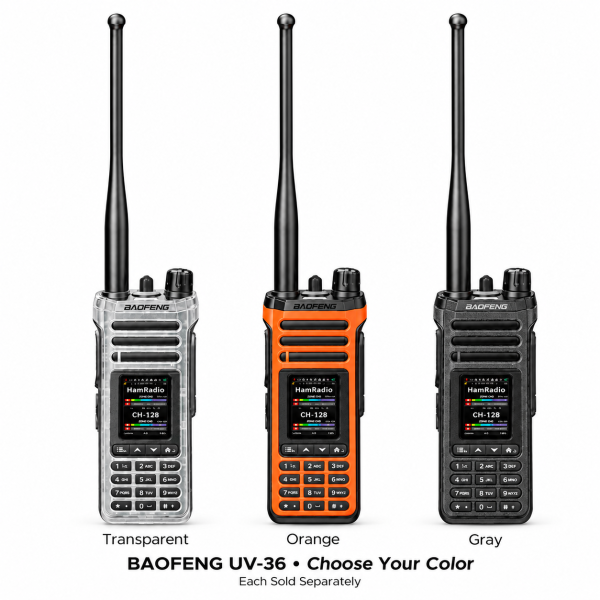
The BAOFENG UV-36 is an analog dual-band handheld radio with a 2.0-inch TFT display, a full keypad and selectable Bluetooth modes. Its current store listing offers Transparent, Orange and Gray finishes. This guide explains how to check its audio, programming and package options before ordering.
Bluetooth audio and data are separate modes
The current listing describes two selectable Bluetooth modes. Audio Mode supports a compatible headset. Data Mode supports radio programming through a compatible application. These modes are selected separately; the listing should not be read as a promise that both operate together.
Before choosing a headset, confirm compatibility with the radio’s installed firmware and the intended audio setup. For app programming, check the supported application and version. Bluetooth support alone does not establish that every phone, app or headset will work.
Compatible accessories are sold separately unless expressly included in your chosen package. If a particular headset is essential to your setup, send its model to our support team before ordering.
Organize channels into useful zones
The UV-36 is listed with up to 1,000 channels across 10 zones. Grouping channels by activity or team can make the channels you use regularly easier to find.
The current listing also describes on-device editing of channel names and receive/transmit frequencies. This is useful for supported changes without relying on a computer for every adjustment. Follow the manual for your exact version and keep a backup of any configuration you manage through programming software.
Start with a small set of confirmed channels. Clear names and verified settings are more useful than filling the memory with an unfamiliar channel file.
Display, dual watch and controls
The 2.0-inch TFT display presents channel information. Dual display and dual watch help you keep track of two selected channel or frequency entries. Consult the manual for the monitoring behavior; showing two entries does not by itself establish simultaneous audio reception.
A full keypad and side controls provide direct access to everyday operations. Channel scanning checks programmed channels, one-touch frequency search assists with finding nearby compatible signals, and VOX enables voice-activated transmission when configured appropriately.
The listing also describes a configurable Man Down Alert based on tilt or inactivity settings. Review its settings and operation in the manual rather than assuming automatic emergency response or guaranteed assistance.
Pick one color and check the package
Choose Transparent, Orange or Gray. The three-color image illustrates the available choices; it is not a three-radio bundle. Each order is for one UV-36 in the selected color.
Check the current package details for included accessories. Do not assume that the pictured color choices, Bluetooth support or charging feature add extra radios, a headset or an additional battery to your order.
USB-C charging and programming resources
The listed USB-C charging interface is mounted on the battery. Use compatible charging equipment and follow the instructions for your exact battery and radio version.
Visit our Downloads page to check available resources, or ask support if you cannot identify a UV-36-specific file. Confirm the model, hardware version and installed firmware before installing software. A similarly named radio’s download should not be substituted, and a programming package is not automatically a firmware update.
See the BAOFENG UV-36 product page for the current color choices, specifications and ordering details. For compatibility questions, email dxu76256@gmail.com with your radio version and the accessory or app you intend to use.
This guide reflects the current store listing. Functions and compatibility depend on configuration and version. Check the requirements for your intended operation and location before transmitting.